A Space for Thoughtful


6-Step Guide to Format Your eBook Like a Pro
Summarize with:
Did you know that there will be around 1.12 billion eBook readers by 2027? Did you also know that you can capture the attention of a high proportion of eBook readers by publishing a well-designed eBook?
A well-designed eBook has the potential to expand your reach, strengthen your connection with your target audience, and boost your profits. To fully harness the advantages of a well-crafted eBook, it is essential to dedicate time to its formatting.
Formatting an eBook is pivotal in differentiating your eBook from poorly designed ones. After completing the final draft of your eBook, the formatting stage is what ultimately transforms your book into an enticing and visually appealing digital publication.
Table of Contents:
- Why Do You Need to Format Your eBook?
- How Can You Format Your eBook?
- Prepress Checklist for eBooks
- What are the 6 Steps to Format Your eBook?
- The Growing Need for Inclusive Content in eBook Publishing
- How DEI Sensitivity Reads Enhance eBook Formatting and Design?
- The Role of Best eBook Converters in DEI Implementation
- DEI and Fixed Layout eBooks: Challenges and Solutions
- Best Practices for Incorporating DEI Sensitivity Reads in E-Publishing
- The Business Case for DEI Sensitivity Reads in E-Publishing
- Wrapping Up
Why Do You Need to Format Your eBook?
By now, you know a bit about the importance of eBook formatting. Let’s go in deeper to understand why formatting plays a crucial role in the eBook creation process.
Correct formatting helps you with the following:
- Increases the readability of your eBook by ensuring a consistent and smooth reading experience
- Enhances the accessibility of your eBook by making it easy to navigate for everyone, including people with disabilities
- Ensures adherence to the eBook publishing guidelines of several digital publishing houses and platforms
- Creates an eBook that looks not only eye-catching and aesthetic but also professional
- Develops a unique brand authority and recognition across the world for your identity as an author
How Can You Format Your eBook?
Now that you know how vital eBook formatting is, let’s understand how you can format your eBook.
Before starting the formatting process of your eBook, you need to zero down on eBook formatting software. The latter could be Microsoft Word, Kindle Create, Adobe InDesign, or other formatting software.
Prepress Checklist for eBooks
If you’re making an eBook for the first time, or need a quick checklist, here is one comprehensive list you can look at:
1. Typesetting
The last thing you need your eBook to have is clutter. You want your readers to have an enjoyable experience while reading, and not be lost in the clutter created by a confusing layout. A neat and tidy layout enriches the reading experience and makes sure your readers are in the mood you want them to be in when they read your eBook. Typesetting is the careful arrangement of text and images to create an appealing design that enhances the reading experience.
It is important to use industry-standard tools, techniques, software, and platforms available in the market at the prepress stage. Seasoned typesetting professionals use the latest software solutions, like InDesign, 32B, and Quark, to provide you with the page layouts that not only suit your work but also make them ready for print or publishing. As far as composition is considered, using services like XML First Workflow is advised.
2. Copy Editing
There is a critical difference between just plainly jotting down ideas and bringing them to life. The latter requires immaculate perfection in terms of syntax, semantics, and grammar. And for those reasons, thorough and comprehensive copy editing is very important to give your eBook a professional touch. Sometimes, there may just be a minor spelling mistake that’s barely noticeable, which is where a professional proofreader comes into play. Therefore, performing a spell check on every word is of the utmost importance at the prepress stage.
The role of copy editing isn’t limited only to checking your eBook from a spelling and grammatical point of view. It involves examining your work from various angles, such as research precision, color corrections, and positioning. For instance, if your writing is non-fiction, it is preferable to have your facts validated and cross-checked from other sources, and this job also comes under the purview of copy editing. Similarly, color correctness also plays a very important role in determining the final quality of your eBook.
3. Illustration and Artwork
It is a known fact that a picture is worth a thousand words. And in the absence of the right graphic design, imagery, and illustration, your work may lack the impact it is capable of. Having a professional for the aforementioned needs is a must, more so in the case of storybooks for children, where pictures play a vital role in getting the message across. Generally, a trained graphic designer is enough to do this job, but in certain cases, you may need the assistance of an experienced illustrator as well.
The technical skills involved in fixing the artwork of your eBook comprise image resizing, pixel management, image enhancement, retouching, reproduction, and graphics creation. Therefore, it is important to look for someone who has hands-on experience in Photoshop, Illustrator, InDesign, and CorelDRAW. If your final output is not limited to an eBook, then it is also advisable to consult someone who understands the nuances of studio printing.
4. Formatting and Compatibility
We live in a digital era where everyone has a different preference when it comes to gadgets. Therefore, it becomes important to focus on the format of your eBook. While there are different formats available for eBooks like MOBI and EPUB, PDF is the most common format across all devices. As important as it is to make sure that your book is print-ready in PDF format, it is, however, also essential to ensure that your eBook is tailored to be compatible across all devices.
When it comes to mailing high-resolution PDFs of your eBook, e-mail doesn’t cut it, because of the large file size. And it becomes a headache to send PDFs to different parties involved in the prepress process. Fortunately, sending these large files is possible through a web-based service provided by Adobe, which offers online storage to save high-resolution files. It also allows you to create a short URL for your PDF that can be shared on your website or blog.
5. Indexing
Indexing in eBooks is much simpler when compared to their printed versions. This is because eBooks allow hyperlinking of the index to the corresponding pages and or chapters in the book. Therefore, it helps to design an intuitive and user-friendly index page for the reader. And at the prepress level, it becomes very important to distil what’s needed on the index and what needs to be omitted. Accordingly, sections and subsections can be created for the eBook.
Book indexing is an art, and it is important to have someone skilled, experienced, and well-versed with the complete prepress process. The method of determining the relevance of the text to the topic of the book is a skill that comes with experience, and considering a seasoned professional for this job is necessary. It also helps to have someone with expertise in UX as an advisor.
What are the 6 Steps to Format Your eBook?
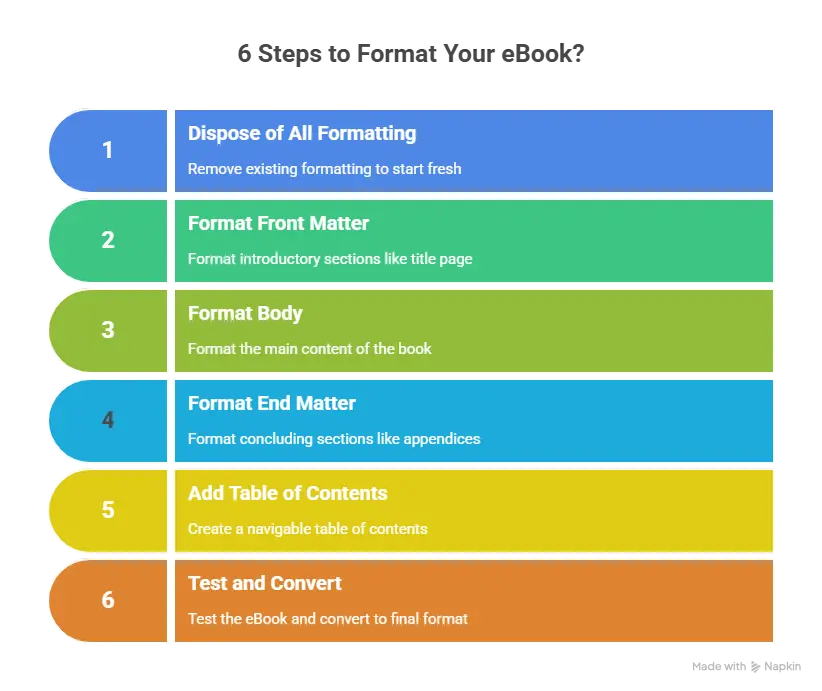
Let’s see how you can format an eBook in just 6 steps:
Step 1: Dispose of All the Formatting
You need to remove all the formatting you did while writing the manuscript. This means removing all the page breaks, automatic numbering, and bullet points, changing the font of the text to common ones like Arial, setting the font size to 11, etc.
Clearing all the formatting from your final manuscript is the first necessary step, as it paves the way to format your whole eBook in the right way. It ensures the content of your eBook gets formatted cohesively and consistently.
Step 2: Format the Front Matter
On the other hand, for a non-fiction eBook, whose front matter is usually longer, you can include a list of other works, accolades, a preface, etc. To format the front matter, add page breaks correctly between all the pages so that different parts/sections begin on a new page.
Step 3: Format the Body
The body includes the main content of an eBook. Format the body to make it look readable and professional by doing the following:
- Setting the Font Style of Chapter Headings: You can select fun font styles and bold or underline the headings.
- Setting the Font Style of the Body Text: You can select standard font styles like Times New Roman and Courier. Maintain a uniform style throughout the eBook.
- Setting the Font Size of Chapter headings and body text: It’s better to avoid large sizes and stick to sizes 14-18 for headers and 10-12 for the main text.
- Including the Headers and Footers: You can include the book title and author name in the header, footnotes in the footer, and page numbers in either the header or footer.
- Adjusting Indents, Line Spacing, and Margins in Your eBook: You can indent the first line of every chapter, set the line spacing between 1.2-1.5, and the margins to around 0.5″ on both sides of every page.
- Adjusting the Paragraphs Properly by Removing Widows and Orphans: Widows and orphans are words that get detached from paragraphs and thus need to be attached to complete the paragraphs.
- Including the Images: You can include in-line images between two paragraphs. The images should be of equal size in the formats of .jpg and .png, and contain captions below them.
Step 4: Format the End Matter
The end matter is the content that comes after the body in an eBook. Like the front matter, you can decide what to include in the end matter. For example, for fiction eBooks, including an acknowledgment page, an about the author page, and an afterword page is more than enough.
On the other hand, for a non-fiction eBook, you can include a glossary page, discussion questions page, bibliography page, etc. To format the end matter, use page breaks to divide new pages correctly and keep their font style and size the same.
Step 5: Add a Table of Contents Page
Once you have formatted the content of the front matter, body, and end matter, add the table of contents page. Create an index and hyperlink all the chapter headings. Also, mention the number of pages each chapter occupies.
After you finish, check the hyperlinks to see whether they work properly. If you encounter any error, correct it by hyperlinking that particular part again.
Step 6: Run a Test and Convert the File
Run a test on the file by seeing a preview of the formatted version of the file. If the formatted version is up to the mark, decide on a conversion format for e-publishing. Converting the file into one of the supported formats, such as EPUB, MOBI, or PDF, completes the eBook formatting process.
The Growing Need for Inclusive Content in eBook Publishing
Consumer demand for content representing diverse voices has surged, reshaping the expectations of the eBook publishing services industry. Readers are increasingly seeking narratives that reflect diverse cultural, racial, gender, and social experiences, urging publishers to produce content that resonates universally.
Representation gaps in traditional publishing have long marginalized underrepresented communities. E-publishing solutions can bridge these gaps by providing tools to create inclusive content. Digital formats, such as fixed-layout eBooks, offer opportunities to enhance representation visually and textually, accommodating diverse storytelling styles.
Inclusive content also meets publishers’ ethical responsibility, fostering equity and respect in their materials. Features like eBook formatting enable publishers to incorporate varied languages, inclusive visuals, and culturally sensitive elements, ensuring broader appeal. By embracing EPUB and EPUB3 advancements, publishers can create interactive and accessible eBooks that enhance diverse engagement.
Incorporating inclusivity into digital publishing solutions is not just a trend but a business imperative. Inclusive content attracts wider readerships, builds brand loyalty, and aligns publishers with the global movement for equity and representation in media.
How DEI Sensitivity Reads Enhance eBook Formatting and Design?
DEI sensitivity reads significantly shape eBook formatting services, ensuring content design respects and accommodates diverse audiences. These evaluations identify biases and provide actionable suggestions for fostering inclusivity in design and layout.
Key ways sensitivity reads enhance eBook formatting and design include:
- Culturally Relevant Visuals: Suggest inclusive character depictions, culturally sensitive illustrations, and appropriate color palettes for diverse audiences.
- Accessibility Features: Advocate for screen reader compatibility, adaptive fonts, and high-contrast options to ensure usability for readers with disabilities.
- Language Representation: Recommend multilingual text options or culturally inclusive language that aligns with global readership needs.
- Interactive Elements: To foster broader engagement, ensure quizzes, animations, and interactive content avoid stereotypes or cultural insensitivity.
- Fixed Layout Optimization: Guide the design of fixed-layout eBooks to reflect diversity while maintaining aesthetic and functional appeal.
The Role of Best eBook Converters in DEI Implementation
Using the best eBook converters for bulk conversion is crucial for upholding DEI principles during format transitions. Converters must maintain content integrity and inclusivity while adapting to diverse digital formats.
Key benefits of using top eBook converters for DEI implementation include:
- Preservation of Inclusive Content: Retains sensitive language, culturally appropriate visuals, and alternative text for images during the conversion process.
- Accessibility Compliance: This feature ensures that screen reader compatibility, adjustable font sizes, and high-contrast modes meet WCAG and Section 508 standards.
- Fixed Layout Consistency: Maintains fixed layout eBook designs critical for textbooks and graphic-rich content without compromising DEI principles.
- Multilingual Support: Facilitates seamless integration of multilingual content, ensuring representation for a global audience.
- Error-Free Bulk Conversion: Ensures large-scale conversions preserve inclusivity by avoiding errors or omissions that could undermine DEI efforts.
DEI and Fixed Layout eBooks: Challenges and Solutions
Maintaining DEI principles in fixed-layout eBooks can be particularly challenging due to their visually intensive and static design. These formats often prioritize aesthetic appeal, making it crucial to strike a balance between inclusivity and the visual experience.
1. Key Challenges in Fixed Layout eBooks
Fixed-layout eBooks often face specific challenges in achieving inclusivity and accessibility. These include:
- Text Placement: Overlapping text and visuals can hinder readability for users with visual impairments or cognitive challenges.
- Visual Representation: Images and illustrations may unintentionally reinforce stereotypes or exclude diverse cultural perspectives.
- Accessibility Features: Fixed layouts are more complex when incorporating screen reader compatibility or alternative text.
2. Solutions Through Sensitivity Reads
Sensitivity reads offer actionable solutions for addressing these challenges effectively. Key strategies include:
- Design Adjustments: Sensitivity reads ensure that text and visual elements are positioned to accommodate diverse readers.
- Inclusive Visuals: Sensitivity experts recommend culturally appropriate imagery that reflects diverse audiences.
- Accessibility Enhancements: Implement features like scalable text, high-contrast modes, and descriptive alternative text without compromising the design.
Best Practices for Incorporating DEI Sensitivity Reads in E-Publishing
Integrating DEI sensitivity reads into eBook publishing workflows is essential to ensure inclusivity and equitable representation in digital content. Below are actionable steps to streamline the process effectively:
1. Plan Sensitivity Reads Early
- Conduct DEI sensitivity reviews during the initial stages of content creation, ensuring inclusivity from the outset.
- Collaborate with writers and designers to align content with DEI principles before significant formatting.
2. Partner with Professional Services
- Engage professional eBook publishing services with expertise in DEI to guide sensitivity reads and maintain inclusivity standards.
- Utilize specialized tools provided by the best eBook converters for seamless format transitions without compromising inclusivity.
3. Prioritize Collaboration
- Build a diverse team of editors, cultural consultants, and designers to identify potential biases effectively.
- To align content adjustments with design requirements and foster communication between sensitivity readers and eBook formatting experts.
4. Leverage Technology
- Use advanced e-publishing solutions to integrate accessibility features like screen reader compatibility and alternative text efficiently.
- Apply digital publishing solutions to automate the inclusion of DEI-compliant elements.
5. Conduct Iterative Reviews
- Implement iterative reviews to evaluate content changes suggested by sensitivity reads, ensuring high accuracy and alignment with DEI goals.
- Test the final output across formats, including fixed-layout eBooks, to verify inclusivity and functionality.
The Business Case for DEI Sensitivity Reads in E-Publishing
Incorporating DEI sensitivity reads into eBook publishing services is ethically essential and a strategic business advantage. Here’s how prioritizing DEI positively impacts business outcomes:
1. Improved Audience Engagement
- Inclusive content resonates with a broader audience, ensuring diverse readers feel seen, valued, and represented.
- Fixed-layout eBooks with DEI principles can create visually appealing and meaningful experiences, thereby boosting reader satisfaction.
2. Enhanced Brand Reputation
- Publishers who prioritize inclusivity are perceived as socially responsible, strengthening trust and brand loyalty.
- By embedding DEI into e-publishing solutions, brands showcase their commitment to equity and diversity, which appeals to modern consumers.
3. Increased Sales and Market Reach
- Diverse content expands market opportunities by catering to underrepresented communities, unlocking untapped revenue streams.
- Digital publishing solutions aligned with DEI principles attract organizations and institutions seeking inclusive materials.
4. Competitive Advantage
- Publishers adopting DEI sensitivity reads stay ahead by addressing evolving consumer expectations for inclusive digital content.
- Leveraging eBook formatting to integrate DEI ensures scalability and relevance in a global market.
Wrapping Up
Ebooks are here to stay. You need to create well-designed and well-formatted digital publications to capitalize on this market.
Since formatting an eBook can be quite time-consuming, you can take the help of the best eBook formatting services to save time and effort.
Hurix offers custom book formatting and conversion services to help you reach your readers quickly. Hurix can transform your eBooks into formats like the fixed layout and reflowable layout. Besides this, Hurix Digital offers digital publishing services to help you publish and securely distribute eBooks to your readers.
For a seamless eBook formatting service experience, connect with Hurix Digital.
Summarize with:

Vice President – Content Transformation at HurixDigital, based in Chennai. With nearly 20 years in digital content, he leads large-scale transformation and accessibility initiatives. A frequent presenter (e.g., London Book Fair 2025), Gokulnath drives AI-powered publishing solutions and inclusive content strategies for global clients